
Introduction
Data Modeling
Data modeling is the process of creating a representation of data that defines the way it is structured and used in complex systems. When it comes to relational databases, designing a normalized data model is essential for efficient database operation, and to make your data consistent and clean.
With a fully normalized data model, data in your relational database becomes:
- Understandable
A good data model can decompose the complexity of real-world systems and the data they generate into a relational model that is easy to read and comprehend, and standardizes the relationship of one data domain with every other data domain.
- Scalable
A well defined and normalized data model becomes scalable, and allows for sustainable development of data-driven solutions for users of your database as the scope of your data grows.
- Modular
A database with a well designed and thoroughly documented data model becomes easy to use by downstream teams such as API designers and front-end developers, minimizing the communication needed for these teams to function independently. Good design will naturally flow downstream of a properly normalized database.
Efficient data model design can help your database be a bedrock for your fellow team members to rely on.
SQLAlchemy
SQLAlchemy is a Python SQL toolkit and ORM (Object Relational Mapper) that allows Python developers to work with relational databases using the Python language. SQLAlchemy is indispensable if you’re a Python developer looking to create a relational data model for your database. The two most significant components of SQLAlchemy are it’s Object Relational Mapper (ORM) and SQLAlchemy Core.
- SQLAlchemy Core
SQLALchemy Core is the foundation of SQLAlchemy, and is independent of the ORM. It provides the connectivity to the database, and by allowing for the construction of SQL expressions that can then be executed against a target database, enabling interaction with a database to in the form of queries.
- SQLAlchemy ORM
The SQLAlchemy ORM (Object Relational Mapper) uses Core as a foundation. The ORM will be the bulk of what we discuss in this blog post. The ORM builds on Core to help create user-defined Python classes that can be mapped into database tables. The ORM is what allows SQLAlchemy to define a data model for a relational database.
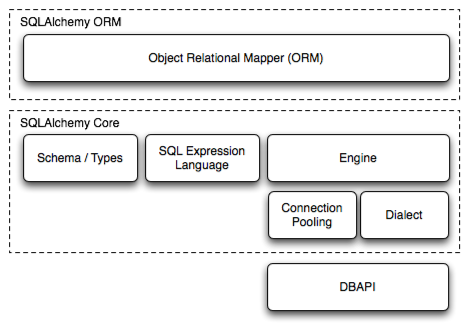
The major components of SQLAlchemy.Taken from the SQLAlchemy documentation.
Alembic
Alembic is a database migration tool written by the author of SQLAlchemy. It helps create a version-controlled system of database migrations that can be used to upgrade a target database to any version of your data model. It uses SQLAlchemy as the underlying engine. By executing migrations in a sequential order, databases can be upgraded and downgraded across versions, even when you are building from scratch.
Alembic is a great way to test your migrations and schema design in a development environment before transferring these migrations to a production environment. An empty database environment can be converted into a database with a production ready schema with just a single command using Alembic.
What we’ll cover
In this blog post, we will cover how you can begin using SQLAlchemy and Alembic to start developing the first iteration of your data model.
We will do the following:
- Create a virtual environment with SQLAlchemy and Alembic installed
- Initialize Alembic
- Design a simple, rudimentary data model with three tables
- Configure Alembic to connect to your database
- Utilize Alembic to generate a migration script
- Migrate your initial data model to the database for the first time
In future posts, we will cover how you can use Alembic to generate database migrations and help grow your database within a version-controlled system, and how this data model can then be plugged into a FastAPI server as a module to help design a modern API service.
Prerequisites
The code in this blog post was written with Python 3.13.1, Alembic 1.14.0 and SQLAlchemy 2.0.36.
You will need the following prerequisites:
A PostgreSQL server initialized and running, with a database that has been initialized but is otherwise empty. We will refer to this server as
developmentfrom here.An installation of
mamba,micromambaorcondaas a package manager to create a new environment. I like to usemicromamba. You can find instructions on how to installmicromambahere.
We will create a new virtual environment using Python 3.13.1 as the pinned version. Create an environment named data_model as follows:
micromamba create -n data_model python=3.13.1 sqlalchemy=2.0.36 alembic=1.14.0 psycopg2=2.9.9 -y
This will create a micromamba environment with the pinned versions of Python and SQLAlchemy that can then be used to follow this tutorial. This environment can be activated with the command micromamba activate data_model.
Using a virtual environment is a good way to keep your base environment uncluttered and free of broken dependencies.
It is good practice to begin any Python project with a virtual environment, even for development workflows.
Other options for virtual environment creation include uv and Poetry.
Lets now get into actually creating some data models!
Getting Started
Setting up the Alembic environment
Before we can start working with our PostgreSQL database, we will first set up the migration environment using Alembic. The reason we set this up first is because we will use Alembic’s config files to connect to our database first before we can begin creating our data model. Alembic uses SQLAlchemy core’s Engine object as a dependency when connecting to a database.
In the root of your project directory, run:
alembic init alembic
This will generate a directory of scripts. The root of your project directory will look like this:
.
├── alembic
│   ├── README
│   ├── env.py
│   ├── script.py.mako
│   └── versions
└── alembic.ini
The directory now includes these files of importance:
alembic.ini
This is Alembic’s main configuration file. When Alembic is run, it looks in the directory for this file. This file is where you will add the SQLAlchemy URL to connect to your database. You can also define multiple environments to run migrations in.
For now we will go with the boilerplate file generated by the alembic init file. Here is what the default file should look like:
# A generic, single database configuration.

[alembic]
# path to migration scripts
# Use forward slashes (/) also on windows to provide an os agnostic path
script_location = alembic

# template used to generate migration file names; The default value is %%(rev)s_%%(slug)s
# Uncomment the line below if you want the files to be prepended with date and time
# see https://alembic.sqlalchemy.org/en/latest/tutorial.html#editing-the-ini-file
# for all available tokens
# file_template = %%(year)d_%%(month).2d_%%(day).2d_%%(hour).2d%%(minute).2d-%%(rev)s_%%(slug)s

# sys.path path, will be prepended to sys.path if present.
# defaults to the current working directory.
prepend_sys_path = .

# timezone to use when rendering the date within the migration file
# as well as the filename.
# If specified, requires the python>=3.9 or backports.zoneinfo library.
# Any required deps can installed by adding `alembic[tz]` to the pip requirements
# string value is passed to ZoneInfo()
# leave blank for localtime
# timezone =

# max length of characters to apply to the "slug" field
# truncate_slug_length = 40

# set to 'true' to run the environment during
# the 'revision' command, regardless of autogenerate
# revision_environment = false

# set to 'true' to allow .pyc and .pyo files without
# a source .py file to be detected as revisions in the
# versions/ directory
# sourceless = false

# version location specification; This defaults
# to alembic/versions.  When using multiple version
# directories, initial revisions must be specified with --version-path.
# The path separator used here should be the separator specified by "version_path_separator" below.
# version_locations = %(here)s/bar:%(here)s/bat:alembic/versions

# version path separator; As mentioned above, this is the character used to split
# version_locations. The default within new alembic.ini files is "os", which uses os.pathsep.
# If this key is omitted entirely, it falls back to the legacy behavior of splitting on spaces and/or commas.
# Valid values for version_path_separator are:
#
# version_path_separator = :
# version_path_separator = ;
# version_path_separator = space
# version_path_separator = newline
version_path_separator = os  # Use os.pathsep. Default configuration used for new projects.

# set to 'true' to search source files recursively
# in each "version_locations" directory
# new in Alembic version 1.10
# recursive_version_locations = false

# the output encoding used when revision files
# are written from script.py.mako
# output_encoding = utf-8

sqlalchemy.url = driver://user:pass@localhost/dbname


[post_write_hooks]
# post_write_hooks defines scripts or Python functions that are run
# on newly generated revision scripts.  See the documentation for further
# detail and examples

# format using "black" - use the console_scripts runner, against the "black" entrypoint
# hooks = black
# black.type = console_scripts
# black.entrypoint = black
# black.options = -l 79 REVISION_SCRIPT_FILENAME

# lint with attempts to fix using "ruff" - use the exec runner, execute a binary
# hooks = ruff
# ruff.type = exec
# ruff.executable = %(here)s/.venv/bin/ruff
# ruff.options = --fix REVISION_SCRIPT_FILENAME

# Logging configuration
[loggers]
keys = root,sqlalchemy,alembic

[handlers]
keys = console

[formatters]
keys = generic

[logger_root]
level = WARNING
handlers = console
qualname =

[logger_sqlalchemy]
level = WARNING
handlers =
qualname = sqlalchemy.engine

[logger_alembic]
level = INFO
handlers =
qualname = alembic

[handler_console]
class = StreamHandler
args = (sys.stderr,)
level = NOTSET
formatter = generic

[formatter_generic]
format = %(levelname)-5.5s [%(name)s] %(message)s
datefmt = %H:%M:%S
To begin with, we will substitute the sqlalchemy.url parameter for the alembic section with the connection string used for our database. As an example, the following is a dummy connection string.
sqlalchemy.url = postgresql://nk_dev:placeholder_password@localhost/development
In the above code snippet:
- The database driver is
postgresql - The database username is
nk_dev - The password of the user is
placeholder_password - The database host is
localhost - The name of the database is
development
The above is an example to begin testing with.
This isn’t the ideal way to store your PostgreSQL server connection details.
Ideally you manage them with a key vault or via injection of environment variables at the time of virtual environment activation.
Remember to never include the alembic.ini file within version control. Always have your config file (alembic.ini) added to .gitignore.
Here are the contents of the .gitignore: file:
alembic.ini
A more in-depth explanation of the alembic.ini file can be found in the official documentation here.
The alembic directory
This directory is the home of the migration environment. The relevant contents of this directory include:
env.py
This is a Python script that can be run when the migration tool is invoked. You can do some cool stuff with this script, like registering entities like views, functions and triggers, and also generating filters to ignore tables that you don’t want to migrate with Alembic.
versions/
This directory holds the individual version scripts. This directory will have the scripts in it run sequentially when upgrading to or downgrading to a particular version of your database. As you begin generating migrations and applying them, this folder will grow. Each migration will become it’s own script, containing both an upgrade and a downgrade parameter for that particular version.
Now that all of this is finally sorted, we can get to creating basic data models!
Creating a file for our data models
Create a file in the project directory called models.py. This file will be where we store our user-defined Python classes that will then be mapped into database tables in the database using Alembic to run the actual migrations. Let’s start with a simple scenario where we have commerce data for customers, products and orders. Each customer can submit multiple orders, and each order can have several products in it.
As a basic assumption, this initial data model isn’t bad, but there is plenty of room for improvement and refinement in the future. Let’s start with defining these three tables as Python classes first.
We will build a one-to-many relationship between customers and orders, since every customer can have many orders, and each order belongs to just one customer. We will build a table to define our products as well.
In future posts, we will expand on this rudimentary data model, building in connections between products and orders. We will also incorporate additional features into our data model, such as views, functions and triggers.
This is what your models.py file will look like:
from sqlalchemy import (
    Column,
    Integer,
    String,
    Float,
    ForeignKey,
    Identity,
    Text,
    DateTime,
)
from sqlalchemy.orm import declarative_base, relationship
from sqlalchemy.sql import func

Base = declarative_base()

class Customer(Base):
    __tablename__ = "customers"

    customer_id = Column(
        Integer, Identity(always=True), primary_key=True
    )
    first_name = Column(String, nullable=False)
    last_name = Column(String, nullable=False)
    email_address = Column(String, nullable=False)

    orders = relationship(
        "Order",
        back_populates="customer",
        cascade="all, delete-orphan",
    )

class Order(Base):
    __tablename__ = "orders"

    order_id = Column(
        Integer, Identity(always=True), primary_key=True
    )
    customer_id = Column(
        Integer,
        ForeignKey("customers.customer_id", ondelete="CASCADE"),
        nullable=False
    )
    order_date = Column(
        DateTime(timezone=True),
        server_default=func.now(),
        nullable=False,
    )

    customer = relationship(
        "Customer",
        back_populates="orders"
    )

class Product(Base):
    __tablename__ = "products"

    product_id = Column(
        Integer, Identity(always=True), primary_key=True
    )
    product_name = Column(
        String, nullable=False
    )
    description = Column(Text)
    price = Column(Float, nullable=False)
With these classes in models.py, We have created the following objects: Customer, Order and Product.
Customer:
This object describes the attributes of the customers. The customer_id column is the primary key of the table, and we initialize it as a serialized integer. We have added some additional parameters to the column (which also apply to the primary keys of every other table).
always=Truemeans the identity is always generated (even if a value is provided)
first_name,last_name and email_address are string columns that cannot be null, and need to be present in the data. This code snippet:
    orders = relationship(
        "Order",
        back_populates="customer",
        cascade="all, delete-orphan",
    )
establishes a one-to-many relationship between customers and orders.
The cascade behavior ("all", "delete-orphan") means that when a instance of customer is deleted, all the associated orders (Orders that used the ID of the deleted customer as a foreign key) will also be deleted, and these changes will cascade downwards to any future child table of the orders table.
Order:
This object describes the attributes of each individual order. order_id is the primary key of this table. We designate the customer_id column as a foreign key from the customers table with this code snippet:
  customer_id = Column(
        Integer,
        ForeignKey("customers.customer_id", ondelete="CASCADE"),
        nullable=False
    )
The foreign key enforces referential integrity, while nullable=False ensures that each order must be associated with a customer. Orders that are associated with non-existent customers, or have no customer at all, will not be possible.
We also establish a many-to-one relationship between orders and customers using the following code snippet:
  customer = relationship(
        "Customer",
        back_populates="orders"
    )
Product:
This object describes the attributes of each individual product. product_id is the primary key of this table, and this table does not have any relationships with any other tables yet. This data model is currently incomplete, but it is a great starting point at which to begin the development and migration of our data model.
With this file complete, our rudimentary data model has been initialized. Without migrating these changes over to the database, however, these will only live as Python classes, and not as database objects.
Doing our first database migration.
The vast majority of database migration workflows with Alembic are done by auto-generating migration scripts. To begin auto-generating migration scripts, we will first need to connect Alembic to the database, and then point alembic towards the target metadata we would like to migrate the data model to.
Alembic can be configured to connect to the database (pointed to be the sqlalchemy.url parameter in the alembic.ini file). For Alembic to compare the state of the database against our target metadata, we will edit alembic/env.py so that Alembic can access the table metadata object that contains the target. Configuring Alembic therefore has two components:
- Connecting Alembic to the database, so that it can compare the state of the database against the target metadata.
- Importing the target metadata, so that Alembic knows what to compare the state of the database against.
Once alembic/env.py is configured, Alembic can then auto generate the “obvious” migrations based on a comparison. In this case, we want it to compare the empty database against our models, and then auto-generate migrations that we can then review and modify before applying.
We have already defined the database connection string in our configuration file. We will begin working with the env.py to access the table metadata object that contains the target.
Editing env.py to import our models
The following is the default content of alembic/env.py. The sections that we will edit have been highlighted.
from logging.config import fileConfig

from sqlalchemy import engine_from_config
from sqlalchemy import pool

from alembic import context

# this is the Alembic Config object, which provides
# access to the values within the .ini file in use.
config = context.config

# Interpret the config file for Python logging.
# This line sets up loggers basically.
if config.config_file_name is not None:
    fileConfig(config.config_file_name)

# add your model's MetaData object here
# for 'autogenerate' support
# from myapp import mymodel
# target_metadata = mymodel.Base.metadata
target_metadata = None

# other values from the config, defined by the needs of env.py,
# can be acquired:
# my_important_option = config.get_main_option("my_important_option")
# ... etc.


def run_migrations_offline() -> None:
    """Run migrations in 'offline' mode.

    This configures the context with just a URL
    and not an Engine, though an Engine is acceptable
    here as well.  By skipping the Engine creation
    we don't even need a DBAPI to be available.

    Calls to context.execute() here emit the given string to the
    script output.

    """
    url = config.get_main_option("sqlalchemy.url")
    context.configure(
        url=url,
        target_metadata=target_metadata,
        literal_binds=True,
        dialect_opts={"paramstyle": "named"},
    )

    with context.begin_transaction():
        context.run_migrations()


def run_migrations_online() -> None:
    """Run migrations in 'online' mode.

    In this scenario we need to create an Engine
    and associate a connection with the context.

    """
    connectable = engine_from_config(
        config.get_section(config.config_ini_section, {}),
        prefix="sqlalchemy.",
        poolclass=pool.NullPool,
    )

    with connectable.connect() as connection:
        context.configure(
            connection=connection, target_metadata=target_metadata
        )

        with context.begin_transaction():
            context.run_migrations()


if context.is_offline_mode():
    run_migrations_offline()
else:
    run_migrations_online()
First, we will import the models.py script. Edit the highlighted snippet to add an import statement.
from models import Base
Then we will replace the target_metadata value with the metadata of our data model. We will change the second highlighted section to:
target_metadata = Base.metadata
Our env.py file should now look like the following, with our changes being highlighted.
from logging.config import fileConfig

from sqlalchemy import engine_from_config
from sqlalchemy import pool

from alembic import context
from models import Base

# this is the Alembic Config object, which provides
# access to the values within the .ini file in use.
config = context.config

# Interpret the config file for Python logging.
# This line sets up loggers basically.
if config.config_file_name is not None:
    fileConfig(config.config_file_name)

# add your model's MetaData object here
# for 'autogenerate' support
# from myapp import mymodel
# target_metadata = mymodel.Base.metadata
target_metadata = Base.metadata

# other values from the config, defined by the needs of env.py,
# can be acquired:
# my_important_option = config.get_main_option("my_important_option")
# ... etc.


def run_migrations_offline() -> None:
    """Run migrations in 'offline' mode.

    This configures the context with just a URL
    and not an Engine, though an Engine is acceptable
    here as well.  By skipping the Engine creation
    we don't even need a DBAPI to be available.

    Calls to context.execute() here emit the given string to the
    script output.

    """
    url = config.get_main_option("sqlalchemy.url")
    context.configure(
        url=url,
        target_metadata=target_metadata,
        literal_binds=True,
        dialect_opts={"paramstyle": "named"},
    )

    with context.begin_transaction():
        context.run_migrations()


def run_migrations_online() -> None:
    """Run migrations in 'online' mode.

    In this scenario we need to create an Engine
    and associate a connection with the context.

    """
    connectable = engine_from_config(
        config.get_section(config.config_ini_section, {}),
        prefix="sqlalchemy.",
        poolclass=pool.NullPool,
    )

    with connectable.connect() as connection:
        context.configure(
            connection=connection, target_metadata=target_metadata
        )

        with context.begin_transaction():
            context.run_migrations()


if context.is_offline_mode():
    run_migrations_offline()
else:
    run_migrations_online()
Auto-generating a migration script with Alembic
Now that env.py and alembic.ini have been configured, and we have created our first data model, we can auto-generate our first migration script! We will run the command:
alembic revision --autogenerate -m "Initial commit, created customers, orders and products"
This code does the following:
- Runs Alembic and creates a new revision.
- Tells Alembic to auto-generate the migration script.
- Creates a message string to use with the revision. In this case, this string is “Initial commit, created customers, orders and products”. This is analogous to a commit message when using git for version control.
You should get output like this:
INFO  [alembic.runtime.migration] Context impl PostgresqlImpl.
INFO  [alembic.runtime.migration] Will assume transactional DDL.
INFO  [alembic.autogenerate.compare] Detected added table 'customers'
INFO  [alembic.autogenerate.compare] Detected added table 'products'
INFO  [alembic.autogenerate.compare] Detected added table 'orders'
  Generating /path_to_your_project/alembic/versions/de5f32c11361_initial_commit_created_customers_orders_.py ...  done
This output means that Alembic has successfully generated a migration script, and the script is located at /path_to_your_project/alembic/versions/de5f32c11361_initial_commit_created_customers_orders_.py. The versions directory will have the following content:
alembic/versions/
└── de5f32c11361_initial_commit_created_customers_orders_.py
The contents of this auto-generated script are:
"""Initial commit, created customers, orders and products

Revision ID: de5f32c11361
Revises:
Create Date: 2026-01-15 16:10:01.002285

"""
from typing import Sequence, Union

from alembic import op
import sqlalchemy as sa


# revision identifiers, used by Alembic.
revision: str = 'de5f32c11361'
down_revision: Union[str, None] = None
branch_labels: Union[str, Sequence[str], None] = None
depends_on: Union[str, Sequence[str], None] = None


def upgrade() -> None:
    # ### commands auto generated by Alembic - please adjust! ###
    op.create_table('customers',
    sa.Column('customer_id', sa.Integer(), sa.Identity(always=True), nullable=False),
    sa.Column('first_name', sa.String(), nullable=False),
    sa.Column('last_name', sa.String(), nullable=False),
    sa.Column('email_address', sa.String(), nullable=False),
    sa.PrimaryKeyConstraint('customer_id')
    )
    op.create_table('products',
    sa.Column('product_id', sa.Integer(), sa.Identity(always=True), nullable=False),
    sa.Column('product_name', sa.String(), nullable=False),
    sa.Column('description', sa.Text(), nullable=True),
    sa.Column('price', sa.Float(), nullable=False),
    sa.PrimaryKeyConstraint('product_id')
    )
    op.create_table('orders',
    sa.Column('order_id', sa.Integer(), sa.Identity(always=True), nullable=False),
    sa.Column('customer_id', sa.Integer(), nullable=False),
    sa.Column('order_date', sa.DateTime(timezone=True), server_default=sa.text('now()'), nullable=False),
    sa.ForeignKeyConstraint(['customer_id'], ['customers.customer_id'], ondelete='CASCADE'),
    sa.PrimaryKeyConstraint('order_id')
    )
    # ### end Alembic commands ###


def downgrade() -> None:
    # ### commands auto generated by Alembic - please adjust! ###
    op.drop_table('orders')
    op.drop_table('products')
    op.drop_table('customers')
    # ### end Alembic commands ###
We can see that a migration script has been generated, with an upgrade and a downgrade parameter. Alembic has compared our target metadata against the database, and has generated a migration script complete with the operations needed to upgrade our database to the state defined by our ORM.
It is important to note that Alembic does not detect every change reliably. There are certain changes that it can always detect, but it is always necessary to manually check the migration file to correct the auto-generated migrations.
From Alembic’s documentation on Autogenerate,
It is critical to note that autogenerate is not intended to be perfect. It is always necessary to manually review and correct the candidate migrations that autogenerate produces.
Alembic’s documentation has a section covering what can and cannot be detected with autogeneration.
Given that our operations here are rudimentary, in this case, the changes needed to apply our data model to the database have been correctly detected and applied, but it is always a good idea to read through the migration script anyway.
Examining the auto-generated migration script
Going through the upgrade function generated by Alembic, we can see that the following migrations have been generated:
The
customers,ordersandproductstables have been created, with their primary keys beingcustomer_id,order_idandproduct_idrespectively.The attributes defined by our
models.pyfile have been correctly added to these newly created tables.From this code snippet:
sa.ForeignKeyConstraint(['customer_id'], ['customers.customer_id'], ondelete='CASCADE'),We can see that thecustomer_idfield in theorderstable has been made a foreign key, connecting to thecustomer_idcolumn in thecustomerstable.
The migration script looks good, and does not need further refinement. Let’s now actually apply our first migration!
Applying the Alembic-generated migration script
We will now apply the migration script with the following command:
alembic upgrade head
This command tells Alembic to upgrade the database to the latest revision (the “head”). Depending on the state of the database, it will work through the scripts located in the versions directory to bring the database’s metadata in line with the most recent migration script.
The output of the command is as follows:
INFO  [alembic.runtime.migration] Context impl PostgresqlImpl.
INFO  [alembic.runtime.migration] Will assume transactional DDL.
INFO  [alembic.runtime.migration] Running upgrade  -> de5f32c11361, Initial commit, created customers, orders and products
Since our database is empty and there is only a single migration script, only that script has been run. The last line confirms that migration de5f32c11361 has been successfully applied.
Examining the database to verify our migration
Connect to your database with the database management tool of your choice. I use DBeaver.
The Entity Relationship Diagram for the public schema of your database should look like this.

Our newly created data model!
We’ve successfully applied our first database migration! We’ve created the customers, orders and products tables, and have built a foreign key relationship between customers and orders.
The alembic_version table has been newly created by Alembic. Alembic uses this table to identify the path to upgrade the database from its current state to the version requested by the alembic upgrade command. In our case, we requested the version head.
Alembic works through the migration scripts in the versions directory, starting from the version found in the database’s alembic_version, up to the script that defined the version requested by us, invoking the upgrade() method in each file to get to the target revision. You can check this by examining the data in the alembic_version table. It should have a single entry, corresponding to the revision of the script we just applied.
Next Steps
This is a great first step towards building a comprehensive data model, but there is a long way to go before we can consider migrating our data model from a development environment to a production environment! In subsequent blog posts, we will cover the following:
- Updating our data model with more tables and relationships to create a proper e-commerce database schema.
- Using an Async engine for asynchronous database connections
- Using the
alembic_utilslibrary to incorporate views, functions and triggers into the version control system. - Configuring Alembic to connect to a production environment, and seamlessly bring the production environment’s schema up-to-date with our final revision.
References
SQLAlchemy documentation, most notably the SQLAlchemy Unified Tutorial Section.
Alembic’s documentation, and importantly, the section covering Autogeneration.